1 December 2025
When Nodes Collide: Collision Algorithms and the Latest Node UI Buzz


It’s been a thrilling time for node-based UI enjoyers.
Let’s do a quick highlight reel:
- Fuser officially launched 🎉, and I highly recommend their essay: Why Every Creative Tool Is Becoming a Node Canvas .
- Vercel rolled out an AI SDK complete with shiny new Workflow UI Elements .
- Weavy as part of their push into flow-based UIs, with the goal of integrating generative AI directly into the design toolchain.
- And just to keep everyone on their toes, OpenAI dropped a node-based Agent Builder .
The best part? Every single one of these is built with React Flow!
U can’t touch this
While exploring OpenAI’s new Agent Builder, we noticed they’d solved a surprisingly tricky problem. They found a way to prevent node overlaps. It’s something that had been on our backlog for a while, and as soon as we saw it, we knew we had to recreate it ourselves.
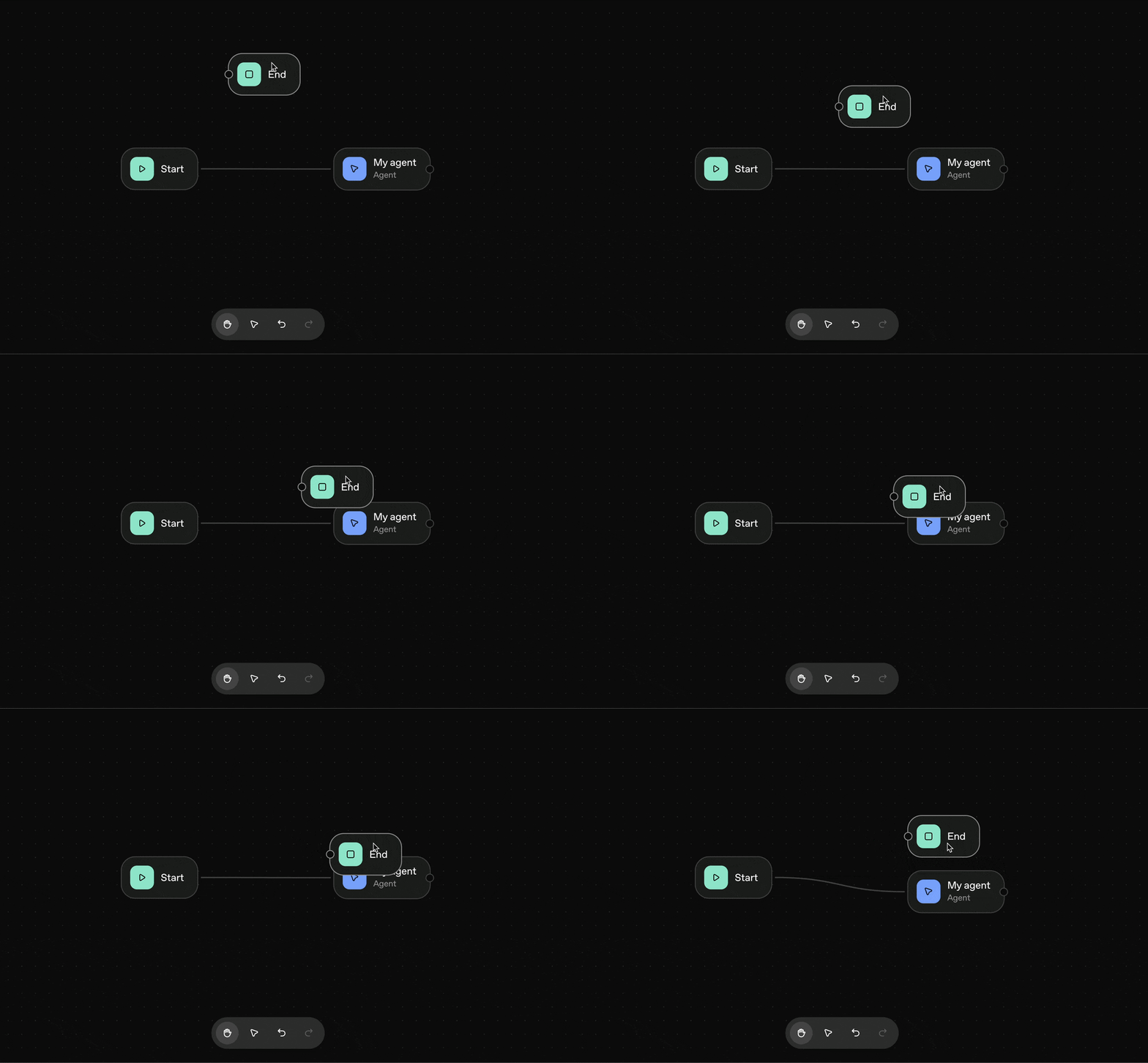
There are a few different ways to approach node overlap resolution, and we wanted to compare them side by side, so we put together a small showcase to see how different algorithms stack up.
Interactive Demo 👇
Interactive showcase comparing collision detection algorithms
Finding the solution
As seasoned programmers, we like to follow a few timeless truths passed down through the ages:
- Premature optimization is the root of all evil.
- You can’t optimize what you don’t measure.
- Computers iterate over arrays pretty dang fast.
So we knew exactly what to do: generate some data, build a benchmark, and most importantly, embrace our inner child by starting with the most naive solution we could imagine.
TL;DR
- The naive solution is hard to beat
- Flatbush is really fast for more than 500 nodes
- The WASM toolchain has become surprisingly nice to use
- Vitest Bench with tinybench provides excellent performance insights
The algorithm they told you not to worry about
For our naive algorithm, we first define bounding boxes for each node, adding a small buffer to account for visual spacing.
Next, it traverses each node in O(n²), checking for collisions with other nodes. We measure collisions from the nodes’ center points, which yields a precise measure of how much each pair overlaps, which helps guide the next step.
Then, we calculate how far each overlapping node needs to move and track which nodes have changed to avoid unnecessary updates. For each overlapping pair, we determine the axis (x or y) with the smallest overlap and move the nodes in opposite directions along that axis. We repeat this process as needed, since resolving one overlap can sometimes create another.
Finally, we generate a new array of nodes with their corrected positions, ensuring all nodes are neatly spaced without introducing unnecessary movement.
Here’s the breakdown in pseudo code:
function resolveOverlaps(nodes, margin):

    overlapFound = true

    while overlapFound:
        overlapFound = false

        for each pair of nodes (A, B):
            if A and B overlap (considering margin):
                overlapFound = true

                overlapX = amount of overlap along x-axis
                overlapY = amount of overlap along y-axis

                if overlapX < overlapY:
                    # Move along x-axis
                    move A left by overlapX / 2
                    move B right by overlapX / 2
                else:
                    # Move along y-axis
                    move A up by overlapY / 2
                    move B down by overlapY / 2

    return nodes
If you are interested in a complete technical rundown and actual implementation, head over to the Github repository .
Choosing the right datasets
To achieve meaningful insights with a benchmark, you should always try to choose datasets that reflect reality. Think of it like this: hosting the globally distributed Kubernetes cluster that serves my website with ten monthly visitors (one of them is my mum, she’s very proud of me) makes about as much sense as optimizing an algorithm for a situation that’ll likely never happen.
If, for instance, 95% of your flows contain fewer than 25 nodes, your benchmarks should focus on that reality. The same logic applies to overlap density: in most cases, nodes aren’t so tightly packed that resolving one overlap will trigger a cascade of movements. Including datasets with reasonable spacing, as well as a dataset with no overlaps, gives you both a baseline and a realistic range of performance.
Here’s an overview of what our synthetic data looks like:
+----------------+----------------+----------------+----------------+
|                | Separated      | Clustered      | Packed         |
+----------------+----------------+----------------+----------------+
| 15 Nodes       |  •          •  |  ••            |        ••      |
|                |                |           ••   |       •••      |
|                |         •      |      ••        |       ••       |
+----------------+----------------+----------------+----------------+
| 100 Nodes      | •  •   •   •   |  ••         •• |     •••••••    |
|                |   •     •   •  |    ••   ••     |     ••••••     |
|                | •   •   •   •  |  ••         •• |      ••••••    |
+----------------+----------------+----------------+----------------+
| 500 Nodes      | • • • • • • •  | ••  ••  ••  •• | •••••••••••••  |
|                |  • • • • • •   |   ••  ••  ••   | •••••••••••••  |
|                | • • • • • • •  | ••  ••  ••  •• | •••••••••••••  |
+----------------+----------------+----------------+----------------+
We like to use real-world data to benchmark whenever possible. As humble library authors, we don’t have access to production datasets… but maybe you can help us out!
If you’d like to see your own data included, it’s super easy: just open a pull request and add an array of trimmed-down nodes to our datasets !
Benchmarking
With the algorithm and data in place, the next step was to see how it actually performs.
To do that, we turned to Vitest , which makes benchmarking
surprisingly straightforward with its bench command
based on tinybench . All we had to do was create a
new test file ending in bench.ts, and we were good to go.
datasets.forEach((dataset) => {
  describe.concurrent(dataset, () => {
    bench(
      'naive',
      () => {
        naive(nodes, options);
      },
      benchOptions,
    );
  });
});
Running vitest bench for our naive algorithm gave us the following mean results on a
14-Core M4 Pro for resolving collisions on different datasets.
Separated (single iteration, no overlaps)
- 15 nodes: ~0.3µs
- 100 nodes: ~8µs
- 500 nodes: ~0.2ms
Clustered (separated clusters, few overlaps)
- 15 nodes: 5 iterations ~0.7µs
- 100 nodes: 9 iterations ~0.5ms
- 500 nodes: 9 iterations ~1.1ms
Packed (many overlaps, tightly packed)
- 15 nodes: 12 iterations ~2µs
- 100 nodes: 80 iterations ~0.5ms
- 500 nodes: 618 iterations ~150ms
Spoiler Alert: It turns out we may have just created a (blazingly?) fast algorithm — one that’s going to be pretty hard to beat.
Putting results into perspective
To understand these results, it helps to consider when the algorithm actually runs. This function isn’t running continuously or on every frame; it only executes when a node is dropped or when changes are submitted. That means runtimes in the millisecond range are acceptable. Looking at the data, we can see:
- There should never be any issues if you’re working with fewer than 500 nodes.
- At around 500 clustered nodes, the algorithm resolves in ~1.1 ms. This is acceptable for most use cases.
- Resolving more than 500 tightly packed nodes can lead to noticeable performance issues, but this is mostly limited to edge cases, like pasting a large number of nodes into an already tightly packed flow.
Note: This benchmark was run on a processor with a very high single-core performance and we will test on more representative machines in the future.
Optimizing with quadtree-ts, rbush and flatbush
The easiest way to optimize O(n²) algorithms is to reduce the effective n. Ideally, we’d get it down to O(n log n), or, if we’re lucky, even O(log n).
Right now, our solution compares every node with every other node — not exactly a performance dream. Luckily, this scenario is a perfect fit for Spatial Acceleration Structures.
These clever data structures trade some upfront computation for the ability to make very fast spatial queries later. Examples of such queries include:
“Which are the 10 closest neighbors of node X?”
“Which nodes lie within region X?”
By limiting the number of comparisons we make at each step, these structures can drastically reduce the number of overlap checks required, making large flows much more manageable.
In our showcase, you can choose from several other algorithms to compare performance and see how different approaches behave. Here are a few we included and the benefits each brings:
quadtree-ts uses quadtrees, which recursively subdivides space and stores only a limited number of nodes in each leaf, allowing for fast queries of nearby nodes.
Both RBush and Flatbush are implementations of packed Hilbert R-trees. The difference is that Flatbush is entirely static — individual nodes cannot be updated — but it stores its data in a single array buffer, making it extremely efficient for memory usage and data transfer between threads.
In short, instead of checking every pair of nodes in an O(n²) loop, we can leverage a spatial acceleration structure to iterate only over relevant overlaps like this:
- for each pair of nodes (A, B):
-    if A and B overlap (considering margin):
+ for each node (A):
+    for every overlapping node (B):
Benchmark results and key findings
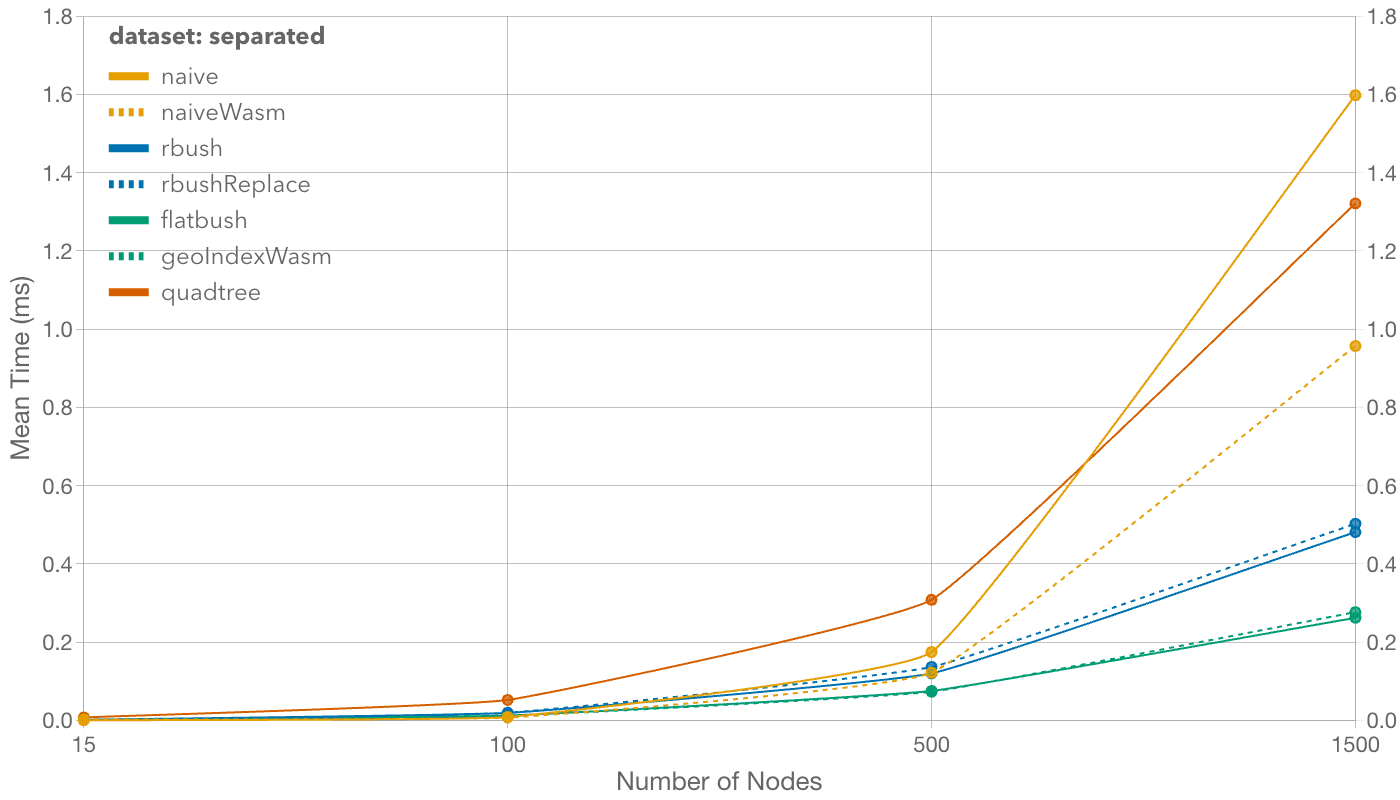
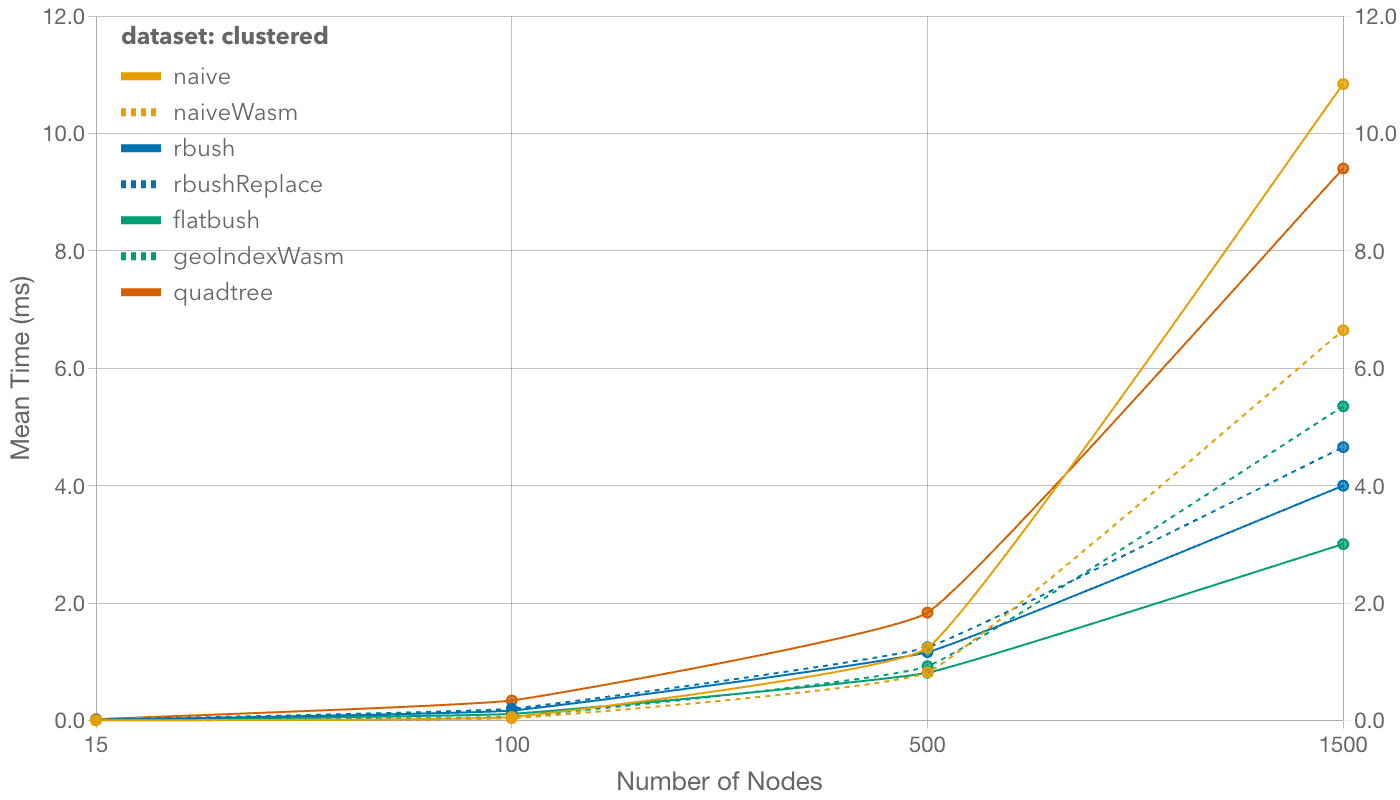
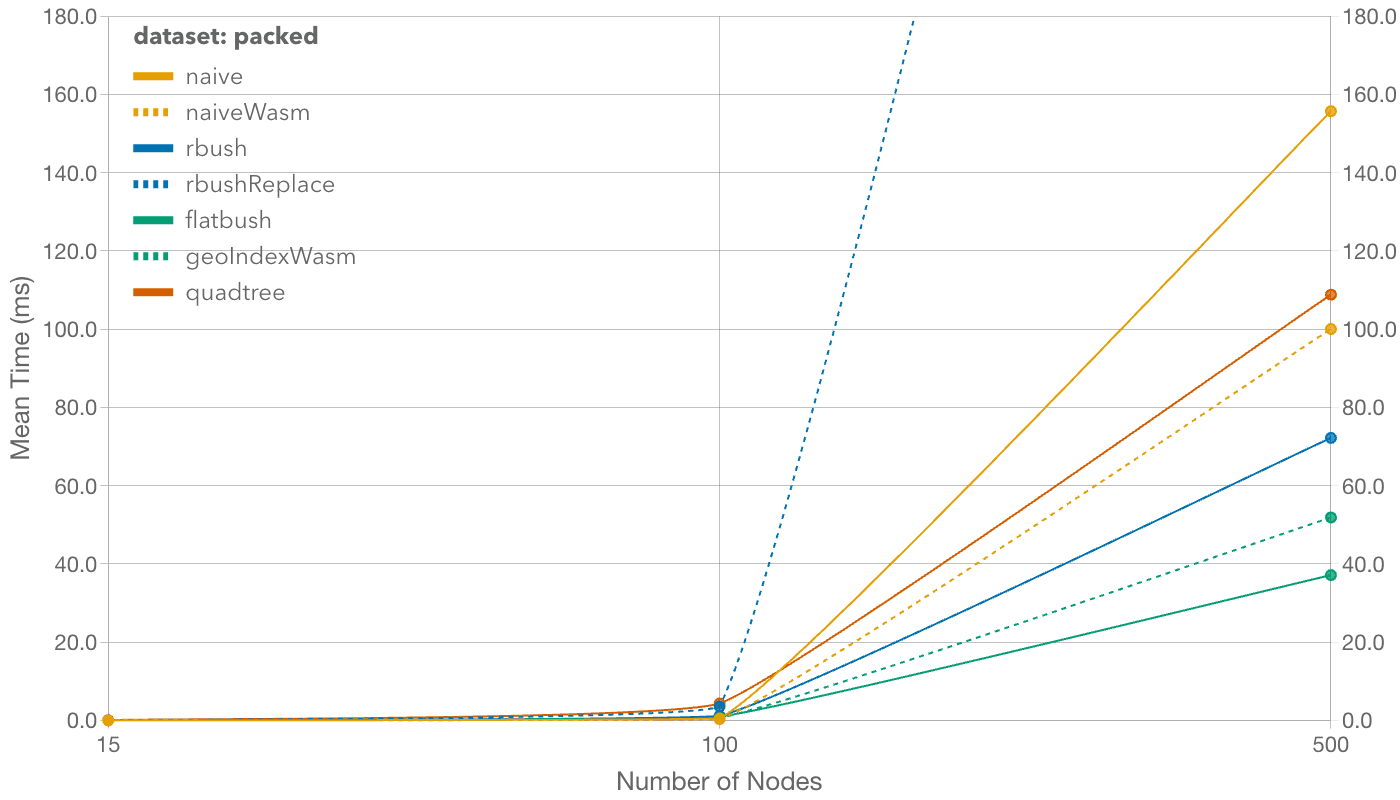
For typical use cases (<100 nodes), the choice doesn’t really matter: Looking at the results for 100-node datasets, the naive solution actually beats all the rest. Kudos to the algorithm they told you not to worry about! In practice, though, the performance difference is negligible — all algorithms perform in the sub-millisecond range. Even in the absolute worst case (the packed scenario, which should almost never happen), the naive solution completes within a single frame.
For anything above 500 nodes, Flatbush’s advantages become clear. It outperforms even its WASM counterpart, geo-index! With only 2.4 kB gzipped bundle size, it’s a very light dependency. Most other solutions perform well in this category, except for quadtree-ts, which doesn’t improve over the naive solution as much as the others. That said, we didn’t tune the quadtree’s parameters, which could be a great opportunity for future optimizations.
Rebuilding indexes too frequently also hurts performance, as shown by the poor results when using rbush’s replace function instead of batch rebuilding the tree on every iteration.
One surprising result is how well the naive WASM algorithm performs! Once it overcomes the initial WASM overhead, it holds up remarkably well for a brute force approach.
Wrapping up
We’re so grateful to the community and thrilled by all the buzz around node-based UIs right now. This work is our passion, and it’s amazing to see what everyone is building with these tools.
Our naive solution works surprisingly well, but we know it can be improved. If anyone wants to take a crack at making it faster or smarter, we’d love to see it!
If you’d like a more technical rundown of our implementation, feel free to check out the GitHub repository — we’d love your feedback and contributions!
25 March 2026
Supporting AI development with React Flow and Svelte Flow


We’ve been thinking about how we can support AI development even when our users aren’t looking at our docs.
Read more14 May 2025
Svelte Flow 1.0 is here!

We celebrate the first major version graduation of Svelte Flow with a full Svelte 5 rewrite and many new features.
Read more